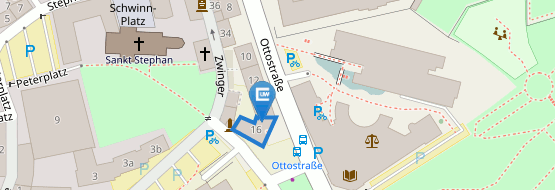

JMU Card Office
The JMU Card provides the following functions:
- Wallet (e.g. for canteens and cafeterias)
- Time recording (for flexitime participants)
- Access authorisation for electronic locking systems
- University library user card
Please log in with your Information Technology Centre account at User-Portal - Information Technology Centre and select " User portal " at the top. Please then select the following button under the heading "Applications": "Available Applications". Here, please select the "View" button for "Apply for JMU Card". Next, you will be asked if you would like to have a photo on the card.
- If you do not want a picture on your JMU Card, please click on the "Submit" button to complete the order.
- If you want your JMU Card with a picture, please click on "Yes". You can then upload a passport photo as a file using the "Datei auswählen" (Browse) button that opens. If you still need to adjust your picture, you can use the "Crop" button to crop the picture to the correct size. Once this is done, please press the "Submit" button to finalise the process or complete the order.
- If you do not have a photo in digital form, you can alternatively request a personalised photo capture sheet, which will be sent to you by e-mail. You can stick your passport photo on there and send it back to the JMU staff card office.
Now all you have to do is save and you can deregister.
You must extend the validity of your JMU Card at regular intervals - usually every two years. To do this, simply go to a validation station to have the validity date automatically extended. The expiry date, which is printed and stored in the chip, is extended by two years or, in the case of fixed-term contracts, to the end of the contract (depending on which event occurs earlier). As this process can be repeated as often as required, you only need to visit a validation machine at the end of the validity period to extend the validity again.
Your JMU Card will be delivered with a limited validity before the first validation (3 months from the date of issue). You should therefore visit one of the validation stations in the near future to extend the validity date.
You will find validation stations at the following locations:
- New University, Sanderring (ground floor, near the student office).
- University Library, Am Hubland (ground floor, hall).
- University Hospital, Josef-Schneider-Str. (Building D7, UG, opposite the student council).
- Wittelsbacherplatz Forum 02.301 (between the old and new building).
- Hubland Campus, Building 55 (Josef-Martin-Weg 55, in the foyer)
- Institute of Anatomy and Cell Biology, Koellikerstr. 6 (by the post office)
Frequently asked Questions
Feel free to ask us if you need help.
Most questions will certainly be answered in the FAQs, but if you can't find what you're looking for there, just send us an e-mail: jmucard(at)uni-wuerzburg.de
No. To do this, please log in with your data centre account at the
with your Information Technology Centre account, select "Available applications" and then "Personal Card (JMU-Card): Issuance".
Your JMU Card is basically ready for use, but still has a provisional validity date. Therefore, please go to a validation machine to provide it with a current validity imprint.
The JMU Card provides the following functions:
- Wallet (e.g. for canteens and cafeterias)
- Time recording (for flexitime participants)
- Access authorisation for electronic locking systems
- University library user card
When applying for the JMU Card at https://www.rz.uni-wuerzburg.de/en/dienste/jmu-account/user-portal/, you can indicate whether you also wish to use your card as a library card and whether the University Library is authorised to use the necessary data for this purpose. Without this consent, a UB number will be printed on the card, but no data will be transferred to the UB and no user account will be created for you.
If you wish, you can also have your JMU Card issued with a picture. As a general rule, only portrait photos (front shots) with as light and neutral a background as possible should be used and the photos should be as recent as possible (not older than one year).
You can upload your picture as a file when applying for the card. It should be in JPEG format, have a 3:4 aspect ratio - as is always the case with normal passport photos - and not exceed 64 kB in size.
The following information is printed on the card:
- Picture (only if desired, otherwise a placeholder will be printed)
- Title, first name, surname
- UB user number
- Chip card number
- Validity date (variable)
The chip contains the following data in addition to the wallet:
- Chip card number
- Personal identification number for the wallet function of the Studierendenwerk (student, employee, guest)
- University identifier (University of Würzburg, Würzburg-Schweinfurt University of Applied Sciences, University of Music, Studierendenwerk)
- Validity date
- UB user number
- Access authorisation
The JMU Card is a chip card based on MIFARE DESFire EV1. This is an RFID system in which communication between the read-write device and chip card is contactless. The chip card must be held at a distance of less than 10 cm from the reader. Each card has a unique ID, the chip number.
You must extend the validity of your JMU Card at regular intervals - usually every two years. To do this, simply go to a validation station to have the validity date automatically extended. The expiry date, which is printed and stored in the chip, is extended by two years or, in the case of fixed-term contracts, to the end of the contract (depending on which event occurs earlier). As this process can be repeated as often as required, you only need to visit a validation machine at the end of the validity period to extend the validity again.
Your JMU Card will be delivered with a limited validity before the first validation (3 months from the date of issue). You should therefore visit one of the validation stations in the near future to extend the validity date.
You will find validation stations at the following locations:
- New University, Sanderring (ground floor, near the student office).
- University Library, Am Hubland (ground floor, hall).
- University Hospital, Josef-Schneider-Str. (Building D7, UG, opposite the student council).
- Wittelsbacherplatz (Forum 02.301, between the old and new buildings).
- Hubland Campus, Building 55 (Josef-Martin-Weg 55, in the foyer)
- Institute of Anatomy and Cell Biology, Koellikerstr. 6 (by the post office)
You should validate your JMU Card shortly after receiving it for the first time; thereafter, it is sufficient to validate the card again before the end of the printed validity period in order to reset the validity date.
Validating the card takes just a few seconds. All you have to do is insert the card into the validation machine and the rest happens automatically.
If the validity of your card is not up to date, you will no longer be able to make cashless payments at the tills in the canteens and cafeterias. Cash top-ups are also no longer possible.
The JMU Card must be treated with the same care as a bank or EC card.
Avoid
- Bending the card (risk of antenna breakage),
- permanent bending of the card,
- exposing it to high temperatures or UV radiation (problems with printing the expiry date during validation),
- heavy soiling, scratching and sticking of the card surface as well as other mechanical influences and
- chemical influences (e.g. washing the card).