Tools & templates (German only at the moment)
We provide many templates (in German only at the moment) for process documentation. Some - such as the process profile and the tabular process illustration - are mandatory. Others are optional or intended as suggestions.
You can find all the process management templates here. After logging in with your JMU account, employees can download the templates. If you have any questions about using the individual templates, please refer to the process documentation handout or the information on this website (e.g. on process documentation and process improvement).
Gulbins-Jackson, Annerose
Learn more about processes, process documentation and analysis, roles and responsibilities in process management in our handout"Process management in the central administration" (German language)(for employees of the University of Würzburg). You can also use the templates, checklists and tables.
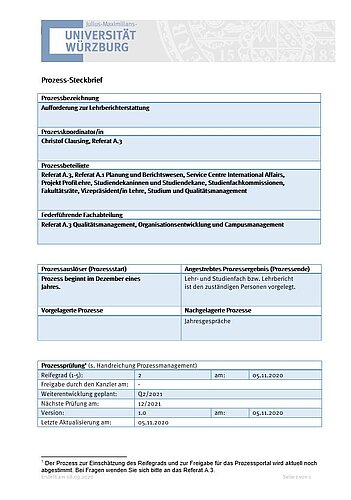
Every process at the University of Würzburg is given a process profile, which contains some important information in a standardised and clear form. The process profile provides an overview of the process and its framework conditions without modelling it in detail.
You can find the corresponding template here: Process profile
Procedure for completing:
- The process is first named in the process profile.
- In addition, the name of the person responsible for the process and
- The lead department is listed.
- If there are other parties involved in the process (internal and external customers who receive the result), these must also be listed.
- Furthermore, the process trigger (s) (process start) must be defined, as well as
- The desired process result (process end).
- If there is an upstream and/or downstream process in the process chain, these must also be named.
- Information on release,
- Maturity level and
- revisions of the process
round off the overview.
If the terms listed here are unclear to you, you will find corresponding definitions in the Introduction tab.
The process table is used to document a process - whether as a description of the current procedure in the actual process or as a draft of the future target process. Its mandatory use means that all ZV employees can easily read and compare the process descriptions.
There are two templates, in Word format and in Excel format. The Word template is sufficient for most processes. However, if a process has a very large number of rows or additional columns, the process table in Excel format may be more suitable.
Process table template as Microsoft Word file (German only)
A process table template for Excel is currently being created.
The flowchart is particularly suitable for introducing other people to a process. However, a graphical representation can quickly become confusing, especially with very large processes. It is therefore not absolutely necessary for process documentation.
Microsoft Word, Excel or PowerPoint are very useful for creating flowcharts.
Instructions "Process visualisation with Microsoft Office" (German only)
First read the instructions on process visualisation with Word, Excel and PowerPoint. It describes how to create a process diagram of the "Flowchart" type and contains further useful tips on creating and saving as a PDF form.
Samples (German only) for flowchart visualisation with
* Taken from http://www.excelvorlage.de/entry/13/flussdiagramm
The "Systematic process analysis" handout is a work aid in which you systematically analyse the process under consideration using key questions. Once you have completed the handout, you have compiled all the important information in one document and can select those aspects from the answers that you want to improve in the next step with those involved in the process.
The "Defining process objectives" handout provides you with helpful tips and guiding questions so that the process objectives can be defined clearly and bindingly.
The "Determining process goals" handout provides you with helpful tips and guiding questions for working backwards - starting from the process result - and thus designing the process in a results-orientated way.
You can use this template to visualise the path of information in your process more precisely. You can also find this template in Feldbrügge/Brecht-Hadrashek 2008.
With this template you can get a complete and clear overview of all forms and their journey through the process. You can also find this template in Feldbrügge/Brecht-Hadrashek 2008.
Every process at the University of Würzburg is given a process profile, which contains some important information in a standardised and clear form. The process profile provides an overview of the process and its framework conditions without modelling it in detail.
You can find the corresponding template here: Process profile
Procedure for completing:
- The process is first named in the process profile.
- In addition, the name of the person responsible for the process and
- The lead department is listed.
- If there are other parties involved in the process (internal and external customers who receive the result), these must also be listed.
- Furthermore, the process trigger (s) (process start) must be defined, as well as
- The desired process result (process end).
- If there is an upstream and/or downstream process in the process chain, these must also be named.
- Information on release,
- Maturity level and
- revisions of the process
round off the overview.
If the terms listed here are unclear to you, you will find corresponding definitions in the Introduction tab.