
Business process documentation
Prioritisation and selection of processes
The best way to learn process management is by doing it. Therefore, start with a process that is currently in your focus. Reasons for this may include
- The process is part of your main task and contributes to achieving your goals.
- The process affects many members of the university, e.g. academics or students. It has a major impact on their experience of the university.
- The process ties up a large part of your resources.
- The process is characterised by the involvement of several departments.
- The process is in need of optimisation, e.g. because it generates many enquiries or corrections. Or it offers great potential for optimisation in other ways, e.g. by avoiding media disruptions, switching to self-service or automation.
- The process must be adapted to changed framework conditions or specifications.
- The process has come into your focus due to a current project, e.g. a software introduction.
You can also create an overview of your area of responsibility by listing your processes and thinking about the order in which you would like to deal with them and the time frame in which you would like to do so. However, avoid tackling all processes at the same time, but use your resources in a planned manner, e.g. by making a prioritised list with the above criteria.
Documenting the current process with a process workshop
As a first step, it is important to record the business process as it is currently "lived", i.e. as it is actually carried out - even if this does not correspond exactly to the specifications or contains abbreviations or duplicate work. Map the process with those involved in carrying it out. You can start with the employees involved in your department, but don't forget those involved from other departments.
This is not yet about a detailed process model, but about the rough sequence of process steps. Possible guiding questions could be
- When or by what exactly is the process started - e. g. by an enquiry, the receipt of a form, the announcement of a decision?
- Organisational transitions are suitable for structuring a process: Does the processor or the processing unit change? Is the location changed? Are special systems used for one step or is there a switch between them?
- What information is required in each case and how does it enter the process? Examples could be: via a form, via enquiries, via own research, from SAP or a database.
- What is the output of the process? What is the goal of the process, if applicable? What forms, information, documents are produced as a result of the process? What happens to this information?
- If there is confusion in your group about certain points or if there is disagreement about where one step ends or the next begins - make a note of this, as this can be an indication of points of friction that can be improved.
- After recording your perspective of the process, also consider how it might look from the point of view of other parties involved in the process (e.g. Offices of the Dean, chairs or students). If it makes sense and is possible, you should obtain information from these process participants.
To document the actual process, we recommend that you organise a workshop with those involved. The individual process steps can be noted down on Post-It notes for illustration purposes - initially by each workshop participant individually, then collated as a group. In this way, the "quieter" employees can also contribute their views, while the common process model is worked out in the group phase. The sticky notes can be stuck up and down on a table or a metaplan wall and thus visually support the discussion of process variants.
Almost every process has different variants (also known as branches). Concentrate on the common cases first (approx. 70-80% of your cases are sufficient). Make a note of the individual variants of your employees if they seem relevant to you - but avoid getting lost in individual details. The result should be a process description of the actual process for your unit or department.
Process interviews and other sources of information
In some cases, a survey of the processes by interviewing individuals is more effective than a workshop. This eliminates group pressure and the possible fear of having to justify your own process implementation or being corrected by others in front of the group.
Before an individual interview, think about what the role of the interviewee is, which topics you want to focus on and in which order you want to work through your topics. Make it clear what your role is towards the interviewee and to what extent he or she can trust that the answers they give will not harm them. Be honest and open about your intentions. If necessary, grant anonymity and record the interviewee's answers without doubt. But also be aware of his or her view of the process.
Process interviews can take place in writing, by telephone/digital or face to face. We recommend that you pre-structure the interview with key questions to ensure that all intended topics are addressed. However, also leave room for additional aspects. Open questions (How? Which? Why?) encourage more detailed answers than closed yes/no questions. In special cases, however, a questionnaire with predefined answer options may also be suitable, e.g. if you want to record the frequency of certain process variants or problems.
You can obtain further information by researching other sources - What specifications are there for the process in question? What is known or documented about case numbers, problems and solution approaches, complaints? Look at a sample of process-relevant files or documents.
Another method is (participatory) observation of the process, i.e. simply going through the process with those involved and asking questions: Why are you writing this down? What do you learn from it? Who is reading this information? Why are you entering this? etc. However, it is important to have a rough overall understanding of the process beforehand, otherwise you will quickly lose the overview in this "ant's-eye view".
Required documents
A tabular process overview and a process profile must be created for complete process documentation. Start with the process table in which you document the process currently used (i.e. the actual process). Once you have an overview of your process, complete the process profile.
If information is still missing for the process profile, these points should be discussed and decided when defining the target process.
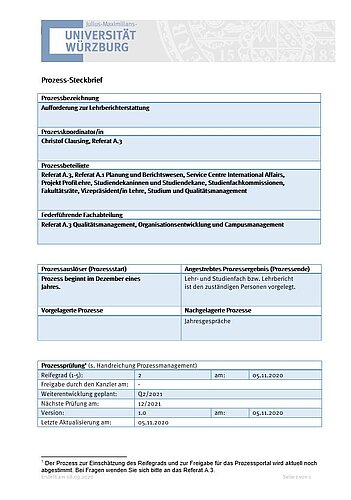
Every process at the University of Würzburg is given a process profile, which contains some important information in a standardised and clear form. The process profile provides an overview of the process and its framework conditions without modelling it in detail.
You can find the corresponding template here: Process profile
Procedure for completing:
- The process is first named in the process profile.
- In addition, the name of the person responsible for the process and
- The lead department is listed.
- If there are other parties involved in the process (internal and external customers who receive the result), these must also be listed.
- Furthermore, the process trigger (s) (process start) must be defined, as well as
- The desired process result (process end).
- If there is an upstream and/or downstream process in the process chain, these must also be named.
- Information on release,
- Maturity level and
- revisions of the process
round off the overview.
If the terms listed here are unclear to you, you will find corresponding definitions in the Introduction tab.
The process table is used to document a process - whether as a description of the current procedure in the actual process or as a draft of the future target process. Its mandatory use means that all ZV employees can easily read and compare the process descriptions.
There are two templates, in Word format and in Excel format. The Word template is sufficient for most processes. However, if a process has a very large number of rows or additional columns, the process table in Excel format may be more suitable.
Process table template as Microsoft Word file (German only)
A process table template for Excel is currently being created.
Additional documents
Other documents, e.g. graphical representations of the process in process diagrams, are optional. You can create these if the visualisation can help those involved in the process to understand certain aspects, e.g. information flows or responsibilities.
The flowchart is particularly suitable for introducing other people to a process. However, a graphical representation can quickly become confusing, especially with very large processes. It is therefore not absolutely necessary for process documentation.
Microsoft Word, Excel or PowerPoint are very useful for creating flowcharts.
Instructions "Process visualisation with Microsoft Office" (German only)
First read the instructions on process visualisation with Word, Excel and PowerPoint. It describes how to create a process diagram of the "Flowchart" type and contains further useful tips on creating and saving as a PDF form.
Samples (German only) for flowchart visualisation with
* Taken from http://www.excelvorlage.de/entry/13/flussdiagramm
Further steps
Once the current process has been recorded, it should be analysed: What is good and should be retained and what is in need of improvement? You will find information on how to proceed on the next page: Process improvement.
We are currently working on a self-assessment sheet for the maturity level of a process so that you can better assess the scope and objectives of the next phase for your newly documented process.